Free and open source · for Claude Code

Run ten Claude Code sessions. Read none of them.

Every question, permission and plan from all your sessions lands in one queue, with only the context it needs. One key each. You decide; you don't reread.

2-minute install · no account · runs on the Claude plan you already have · macOS, Windows, Linux

Grey and calm until something needs you.

The real app, no sound. Play the full 45-second film with its score ▶

10sessions side by side, each in its own worktree
1 keyto allow, deny or answer anything
0servers, accounts or stored tokens
MITopen source, every line on GitHub

Same question. Two ways to answer it.

In a terminal you rebuild the context for every decision. In Cockpit it arrives with the question, and the safe answer is one key.

Claude Code in a terminal

claude — ~/code/shop-worktrees/retire-invoices · tab 6 of 8
⏺ Read(src/billing/invoices.ts)
⎿ Read 214 lines
⏺ Update(src/billing/invoices.ts)
⎿ Updated with 6 additions and 3 removals
⏺ Bash(bun test src/billing)
⎿ 48 pass, 0 fail
⏺ Searching for invoices_v1 readers…
⎿ Found 0 files
✻ Thinking…
⏺ The readers are moved. Backfill next.
⏺ Bash(bun run backfill --dry-run)
⎿ 12,408 rows would be copied
⏺ Bash(bun run backfill)
⎿ 12,408 rows copied
⏺ Dropping the old table now.
⏺ Bash(psql "$PROD_DATABASE_URL" -c …)
Do you want to proceed?
❯ 1. Yes 2. No
⏺ Read(src/billing/report.ts)
⎿ Read 96 lines
⏺ Update(src/billing/report.ts)

Which table? Which database? Scroll up and find out, in one of eight tabs.

Claude Code in Cockpit
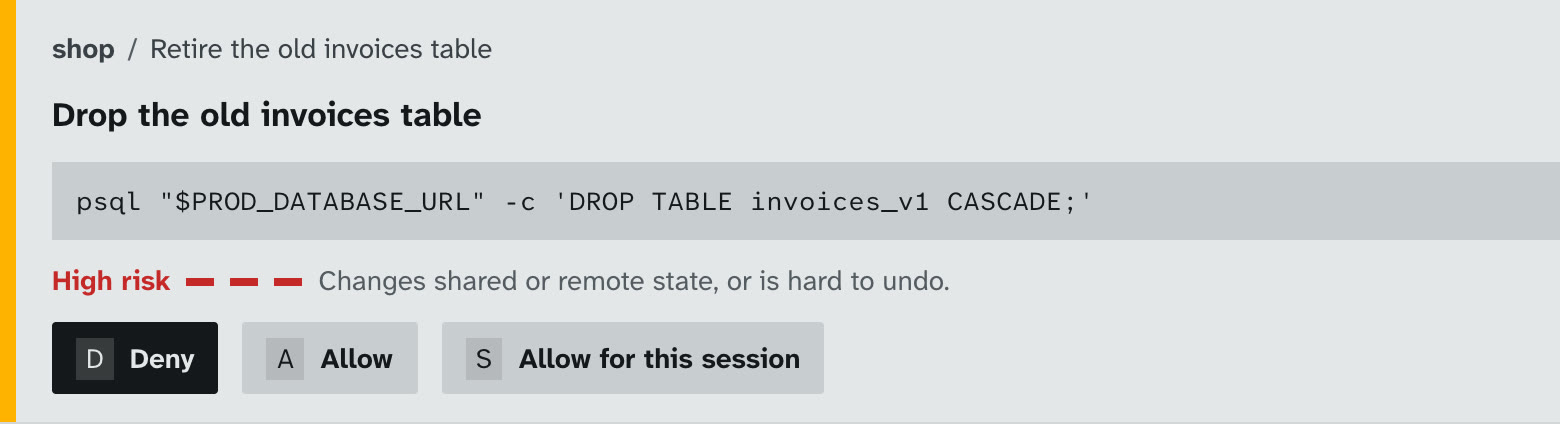
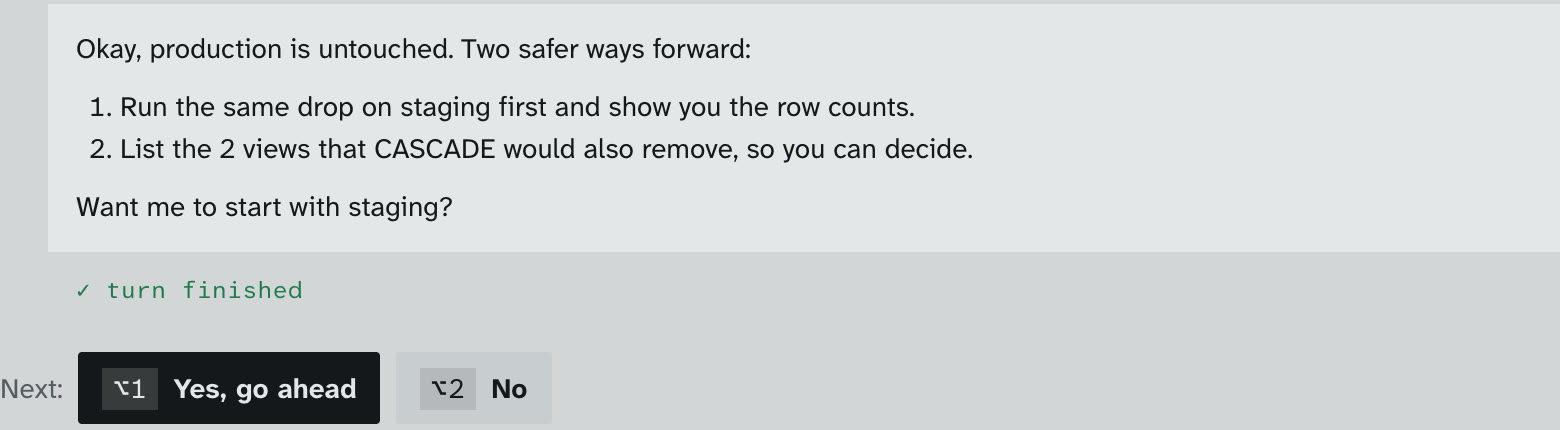
The same request as a card: the exact psql command against production, High risk in red, Deny as the first keyAfter Deny, Claude offers to run it on staging first

Production, CASCADE, high risk. Press D, and Claude comes back with a safer plan.
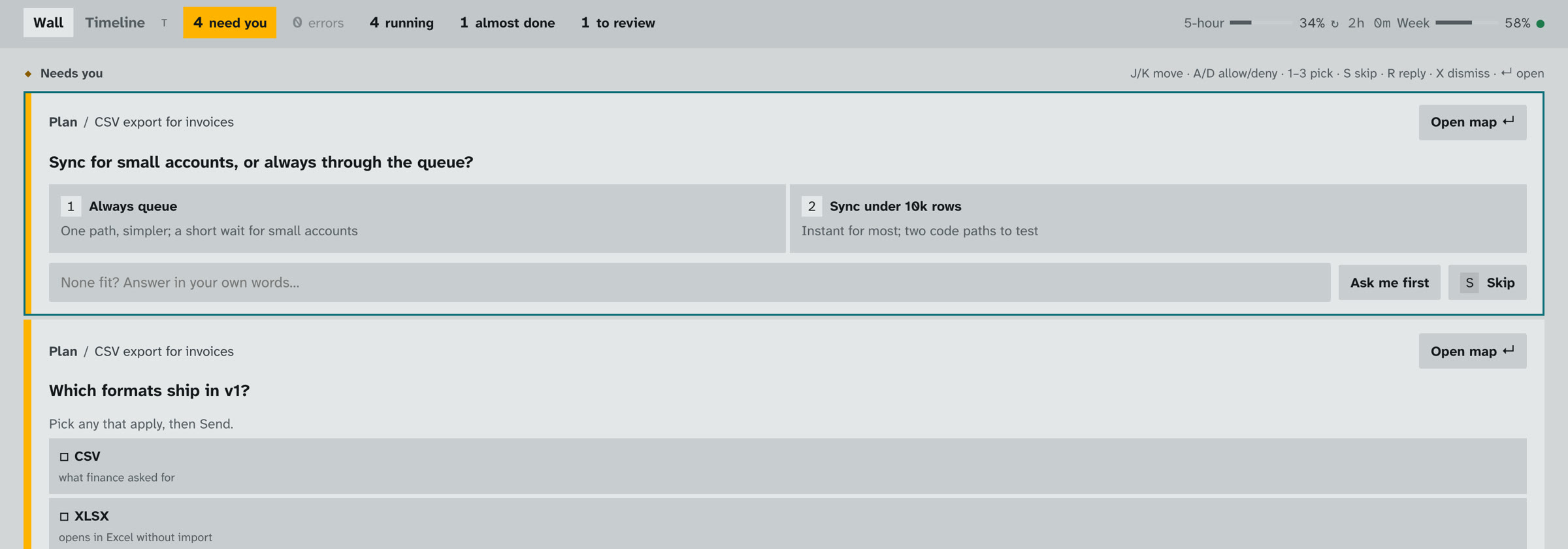
Only what you need to decide.

Reading is the tiring part. A terminal makes you rebuild the context for every decision. Cockpit brings it with the question and leaves everything else out.

Only the decision

  • The question, the options and their trade-offs. You don't scroll back through 400 lines to see why it's asking.

Only the risk

  • The exact command, where it runs, and how hard it is to undo, highlighted before you press a key.

Only what changed

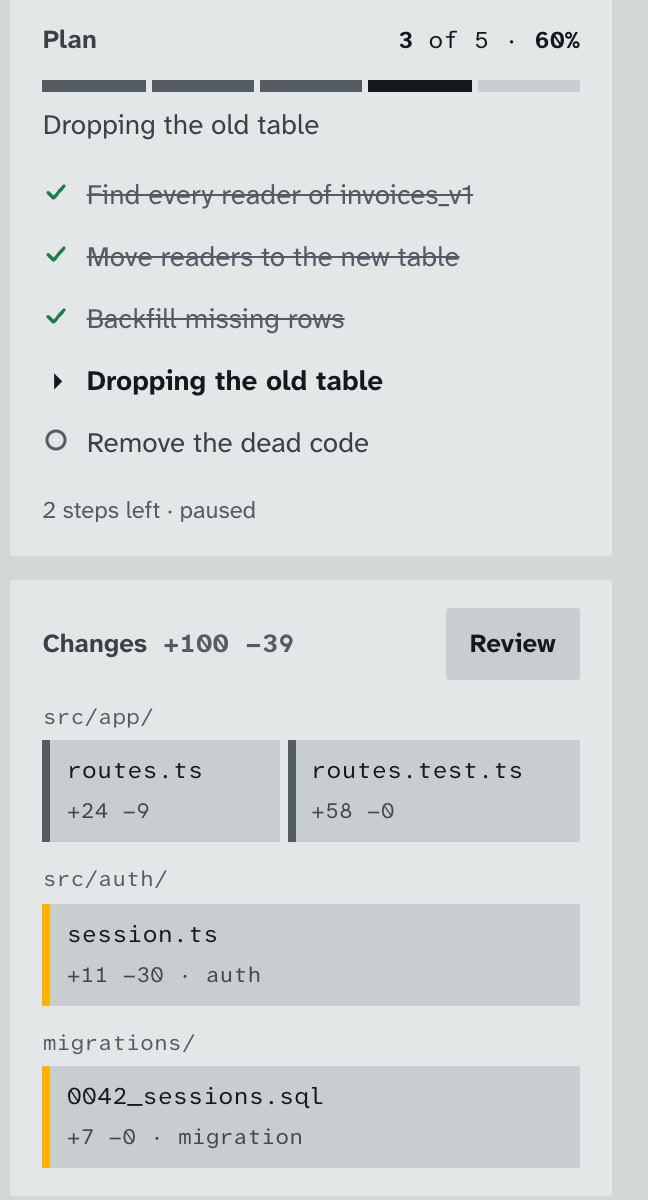
  • The plan's progress and the files it touched, grouped by folder. Auth and migrations are flagged.

What changed for me

“The difference I didn't expect was how much less tired I was. Each decision arrives with only the context it needs, so I'm not rebuilding it from scrollback every time.”

Bohdan Kostko, who built Cockpit
~7 → ~70Claude Code sessions a day
4 → 11sessions running at once at peak (14 on the busiest day)

My own numbers: 25 days in terminals vs the first 4 days in Cockpit. A small sample, and most of that week went into building Cockpit itself. Measured from session file timestamps; no content was read.

A morning with eight sessions.

Four moments where Cockpit saves you the reading.

1

Everything that needs you, in one queue.

Questions, permissions and plan approvals from every session, oldest first. Press 1–3 to pick, A to allow, D to deny. The session carries on by itself.

The Needs-you queue with a question and its options
2

Catch the command that sounds harmless.

Claude says "drop the old invoices table." The card shows the rest: it's production, and it's CASCADE. Press D, and Claude comes back with a safer plan instead of a restore from backup.

A production DROP TABLE flagged high risk, waiting for approval
After Deny, Claude proposes running it on staging first
3

Claude says it's done. Cockpit checks.

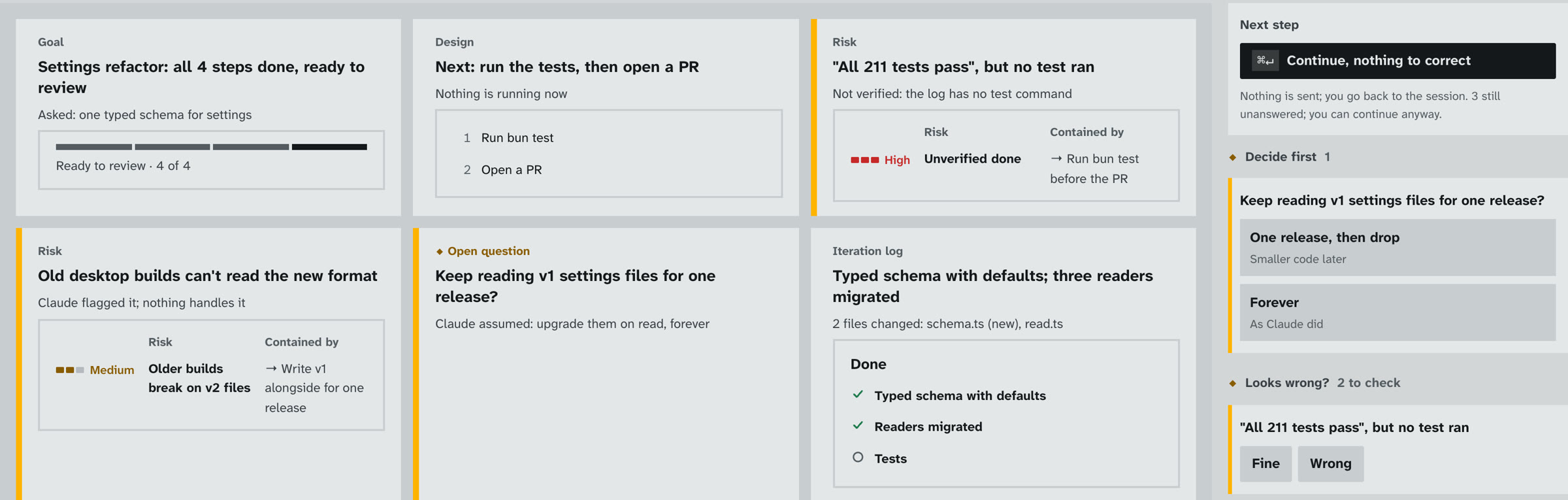
Press ⌘⇧U on any session for a one-page catch-up: where it is, what it decided without asking, and which claims the log doesn't back up. "All 211 tests pass" with no test in the log is flagged before you open a PR.

A catch-up brief flagging 'All 211 tests pass, but no test ran' as high risk, with an open question Claude never asked
4

Plans you can read in ten seconds.

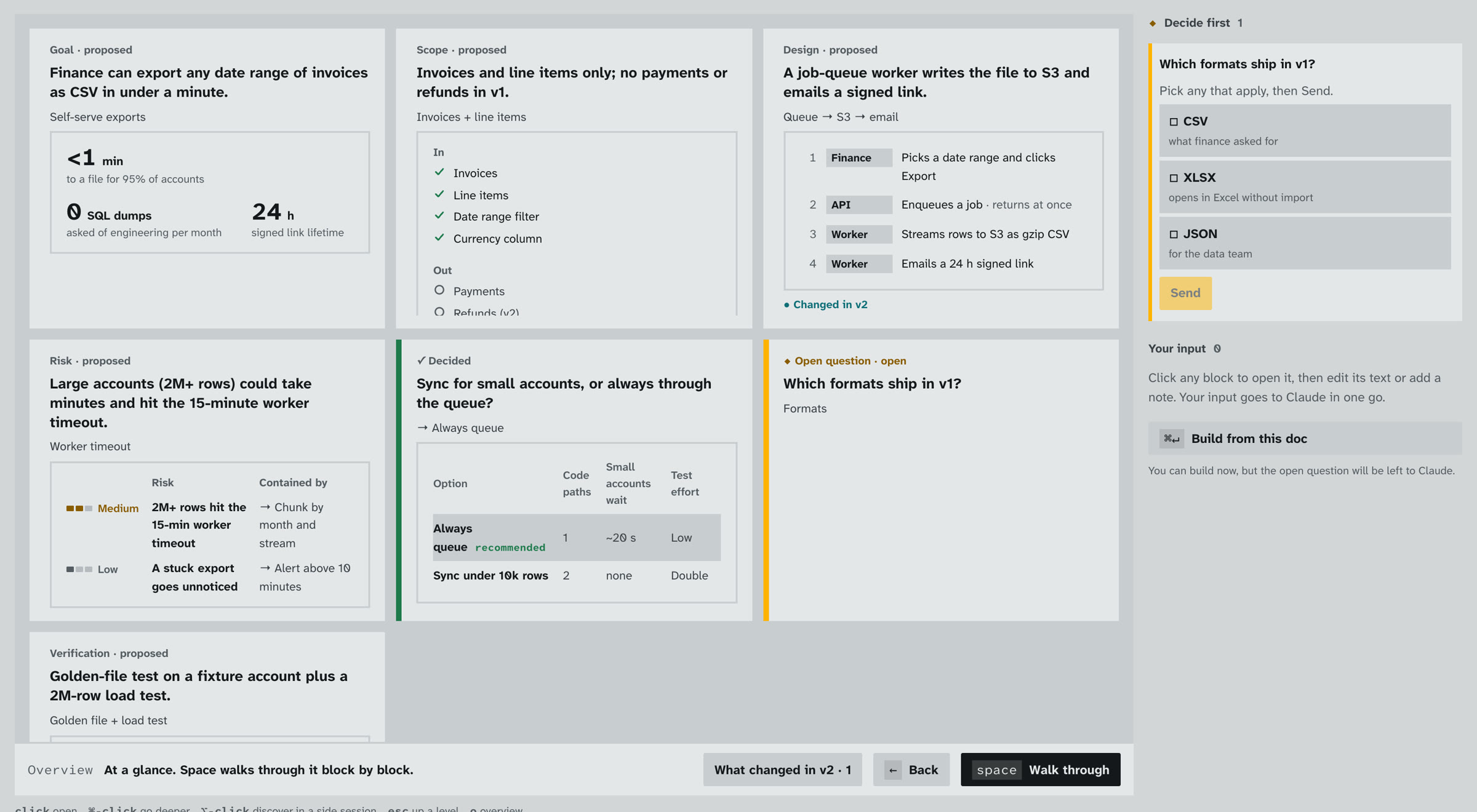
Ask Claude to plan before it codes and you get a one-page map: goal, scope, design, risks and open questions, each drawn the way it reads best. Mark it up, send every note at once, then hit Build from doc.

A plan as a map of blocks with open questions pinned to the side

Also in the box

Plan progress and the change mapChange mapEvery session's plan with live progress, and the files it touched grouped by folder. Auth and migrations are flagged.
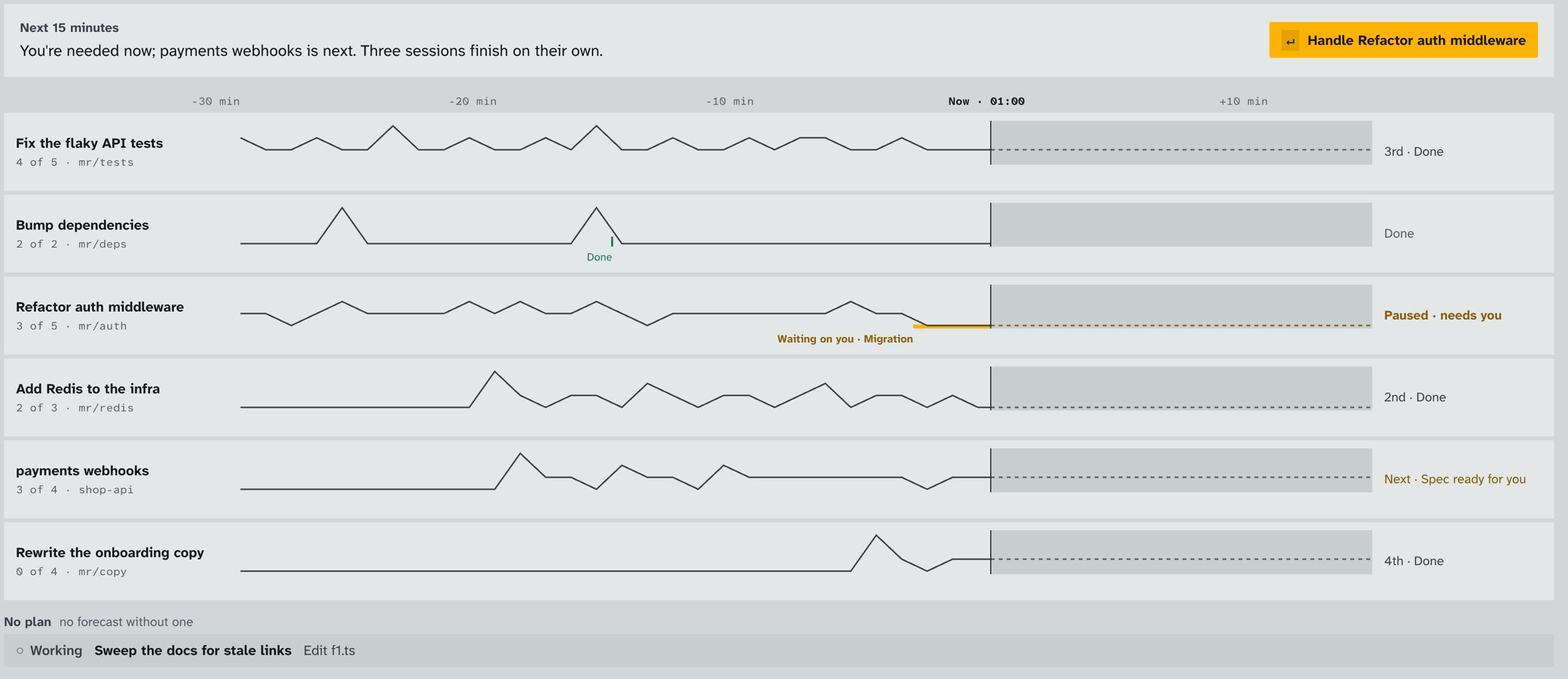
Timeline of sessions with forecastsTimelineWhat every session did, what it does next, and who will need you in the next 15 minutes.
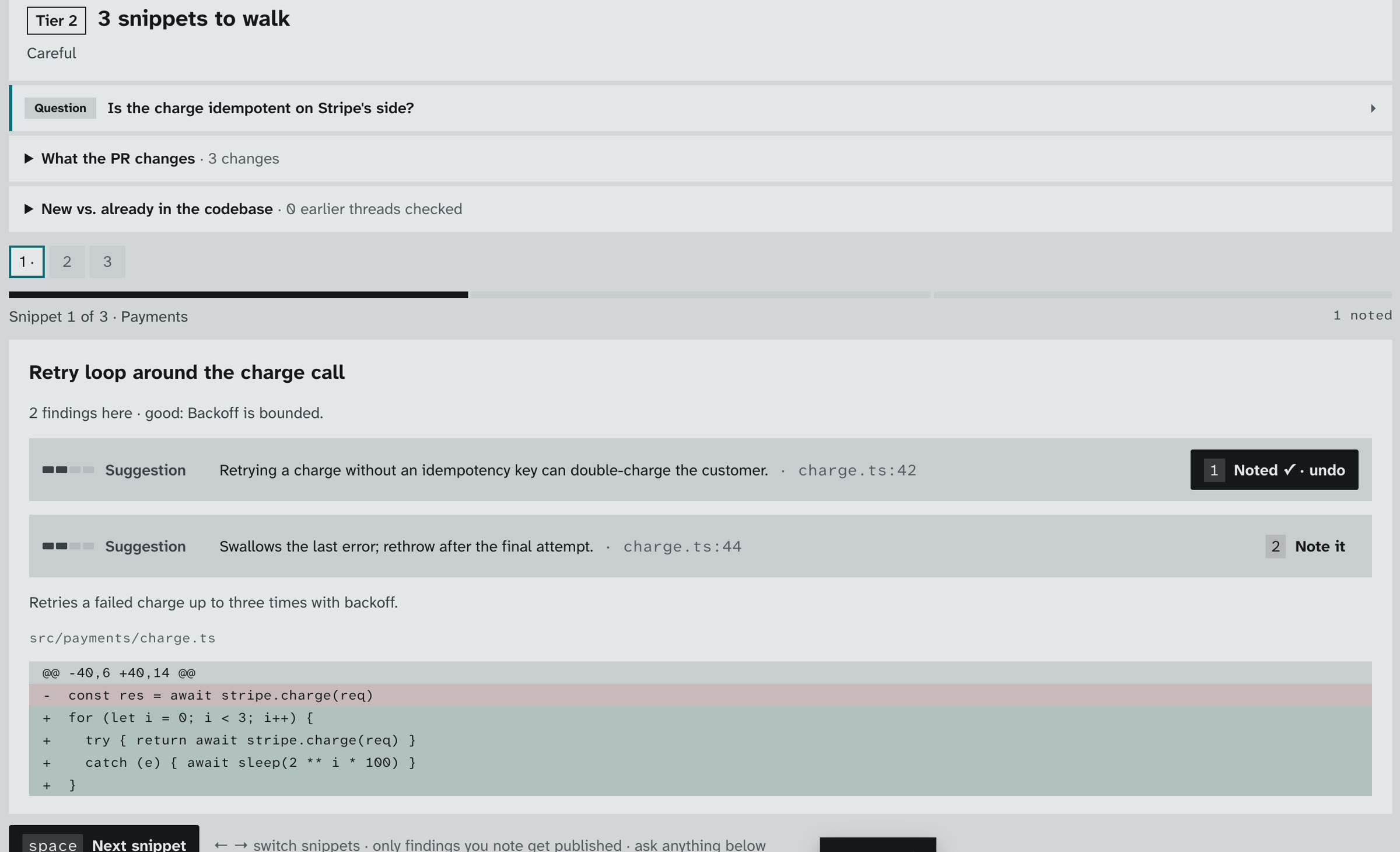
Guided PR review with a noted findingPR review, one finding at a timeRiskiest snippets first; one key turns a finding into a review comment. Address mode turns reviewer threads into fixes.
A worktree per sessionTen sessions on one repo never trip over each other. Start one from anywhere with ⌘K.
Your terminal, one key awayThe raw transcript is ⌘R; hand any session to a real terminal with ⌘T.
A workspace per clientSeparate Claude sign-ins, memory and history per client, sharing your skills and settings. Switch with ⌘1–9.

Your Claude. Your machine.

Cockpit drives the Claude Code you already use, through Anthropic's official Agent SDK, signed in as you. Your skills, hooks and settings all keep working.

No tokens touchedIt never reads or stores your Claude login.
No serverHistory stays in a local file on your computer.
No lock-inHand any session to a real terminal with ⌘T.
No costMIT licensed. It uses your existing plan, with nothing extra to pay.

Up and running in 2 minutes.

You need Claude Code, signed in. Don't have it yet?

# 1. Claude Code, signed in once (skip if you have it)
$ curl -fsSL https://claude.ai/install.sh | bash && claude

# 2. Cockpit: macOS or Linux, no security prompts
$ curl -fsSL https://getcockpit.github.io/install.sh | bash

Prefer a normal download? Pick yours below.

macOS

macOS 11+ · Apple Silicon and Intel
The one-line installer above skips the "unidentified developer" prompt. From the .dmg, run xattr -dr com.apple.quarantine /Applications/Cockpit.app once.

Windows

Windows 10/11 · x64
If SmartScreen asks: More info → Run anyway

Linux

x64 · Ubuntu 22.04+, Fedora 38+
Windows and Linux are new, so please report anything odd

Questions

Is it really free?

Yes. Cockpit is MIT licensed. Your sessions use your existing Claude plan (Pro, Max, Team or API), exactly as they do in a terminal.

Do my skills, commands, hooks and settings still work?

Yes. Cockpit runs your real Claude Code with your real setup. Workspaces keep memory and history separate per client while sharing your skills and settings.

What if a card gets something wrong?

The full transcript is one key away (⌘R), and every approval shows the exact command before it runs.

How is this different from Conductor or Vibe Kanban?

They help you run agents in parallel. Cockpit is about deciding: one queue across every session, one key per answer, risky commands and unbacked claims flagged before you act. It runs locally on your own Claude Code, with no account and no cloud.

Why one git worktree per session? Don't they share my environment?

Each session gets its own checkout so edits never collide, while it uses your normal machine, tools and Claude setup. Like any fresh clone, a worktree may need its dependencies installed; ask the session, or note it in your project's CLAUDE.md. Prefer your own checkout? Turn worktrees off when you start a session. Review and Address always run in your existing clone.

Is this made by Anthropic?

No. Cockpit is an independent open-source project built on Anthropic's public Agent SDK. "Claude" and "Claude Code" are trademarks of Anthropic.

Can I build it or contribute?

Please do: git clone https://github.com/getcockpit/cockpit && ./scripts/dev.sh. See CONTRIBUTING.md.

Stop reading. Start deciding.

Free, open source, and running in two minutes.